How I Made a Realistic AI Short Film With Seedance 2.5 (Every Prompt Included)
The full workflow behind my AI kidnapping short film: how I broke down a viral reel frame by frame, built character sheets and environment plates, and wrote the exact Seedance 2.5 prompts for every shot.
Everything in my kidnapping short film was made with AI: the street, the Cadillac, the smoky office, the masked guards, the girl and me as the mafia boss. Nothing was filmed. I generated it on Akool using the Seedance 2.5 model, and below you'll find every prompt I used, the reference images, and the mistakes I had to fix along the way.
The short version of how to make realistic AI videos: break a reference video down shot by shot, lock your characters and locations as images first, then prompt each shot with exact camera, timing and emotion. Most AI videos look fake because people skip the first two steps and try to do everything with one text prompt.
What does the final video look like?
It's a 40 second comedy short in four beats:
- A girl is kidnapped off a sunny street by masked men in a black Cadillac.
- The hood comes off. She's dazed, in a dark office, facing a mafia boss.
- He says he has an offer: "You make... those videos." She's offended and assumes the worst.
- The twist: he means AI videos. Realistic ones. Then he tells you to comment "realism".
What tools do you need?
| What | What I used | Why |
|---|---|---|
| Video generation | Akool (Seedance 2.5 model) | Strong realism, multi-shot prompts, image references |
| Image generation | Any good image model (Nano Banana, GPT Image, Seedream) | Character sheets and environment plates |
| Editing | CapCut or any editor | Trimming, captions, end card |
| A reference video | A viral reel I liked | Gives you proven pacing and shot structure |
Want to try it? Start on Akool here. It's an affiliate link, so I may earn a small commission at no extra cost to you.
Step 1: How do you break down a reference video?
Don't just watch the reference. Step through it frame by frame. I went through the original reel at 0.3 second steps, and for the fast moments at 0.05 to 0.15 seconds. That's how I caught details I'd completely missed the first time:
- The car isn't parked. It drives into frame and stops right behind her.
- There's no fade on the hood shot. It hard cuts straight into the hood being ripped off.
- She barely blinks. Her eyes stay shut, her mouth hangs open, and there's one quick weak flutter.
For each shot, write down: the time range, the framing (wide, medium, close-up), what the camera does, what the character does, and the line of dialogue. That table becomes your prompt plan.
| Time | Shot | Action |
|---|---|---|
| 0 to 8s | Handheld wide, street | Car drives in, kidnap, car drives off |
| 8 to 10.5s | Extreme close-up | Hood ripped off, dazed |
| 10.5 to 12s | Medium-wide, office | Boss leaning back with cigar |
| 12 to 14s | Medium | Girl shouts "Why did you bring me here?" |
| 14 to 19s | Medium close-up | Boss exhales smoke: "To make you an offer" |
| 19 to 30s | Insert, close-ups, over-the-shoulder | The misunderstanding |
| 30 to 38s | Close-ups | "AI videos" reveal and her reaction |
| 38 to 42s | Medium-wide | "Comment realism, kid" |
Step 2: How do you keep characters consistent in AI video?
Make a character sheet for every person before you generate a single clip. A character sheet is one image with three panels: full body, front close-up and side profile, on a plain grey background. You upload it as a reference in every shot, and the face and outfit stay the same across cuts.
Start from a real photo and change only the outfit to fit the scene.
Boss character sheet prompt
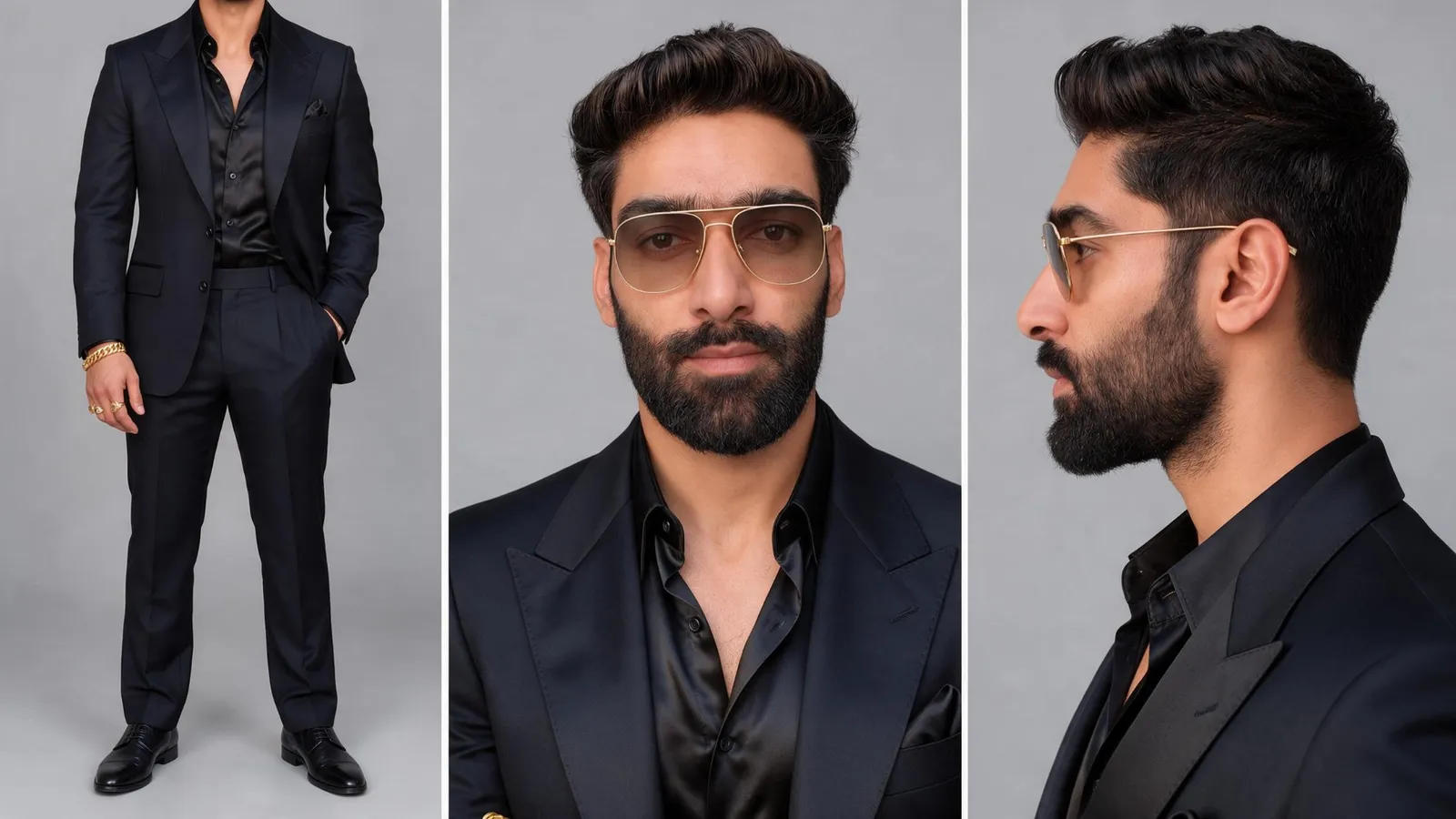
Using the reference image, keep the exact same man: same face, facial features, skin tone, beard, eyes and identity. Do not change his face.

Change only his outfit and styling to a 1970s mafia boss look:
- Tailored dark black suit with wide lapels, slim fit
- Black silk shirt, top two buttons open, no tie
- Dark pocket square
- Tinted aviator-style glasses with thin gold frames and light amber/grey lenses
- Gold rings on two fingers and a chunky gold bracelet on one wrist
- Black leather Oxford shoes
- Hair slightly slicked back and styled, same hair color and length

Create a character reference sheet in the same layout as the reference: three panels side by side on a plain light grey studio background.
Panel 1: full body, standing, front view, one hand in pocket.
Panel 2: front close-up portrait, head and shoulders, wearing the tinted glasses.
Panel 3: side profile close-up, head and shoulders.

Soft, even studio lighting, photorealistic, sharp detail, consistent outfit across all three panels.
Girl character sheet prompt
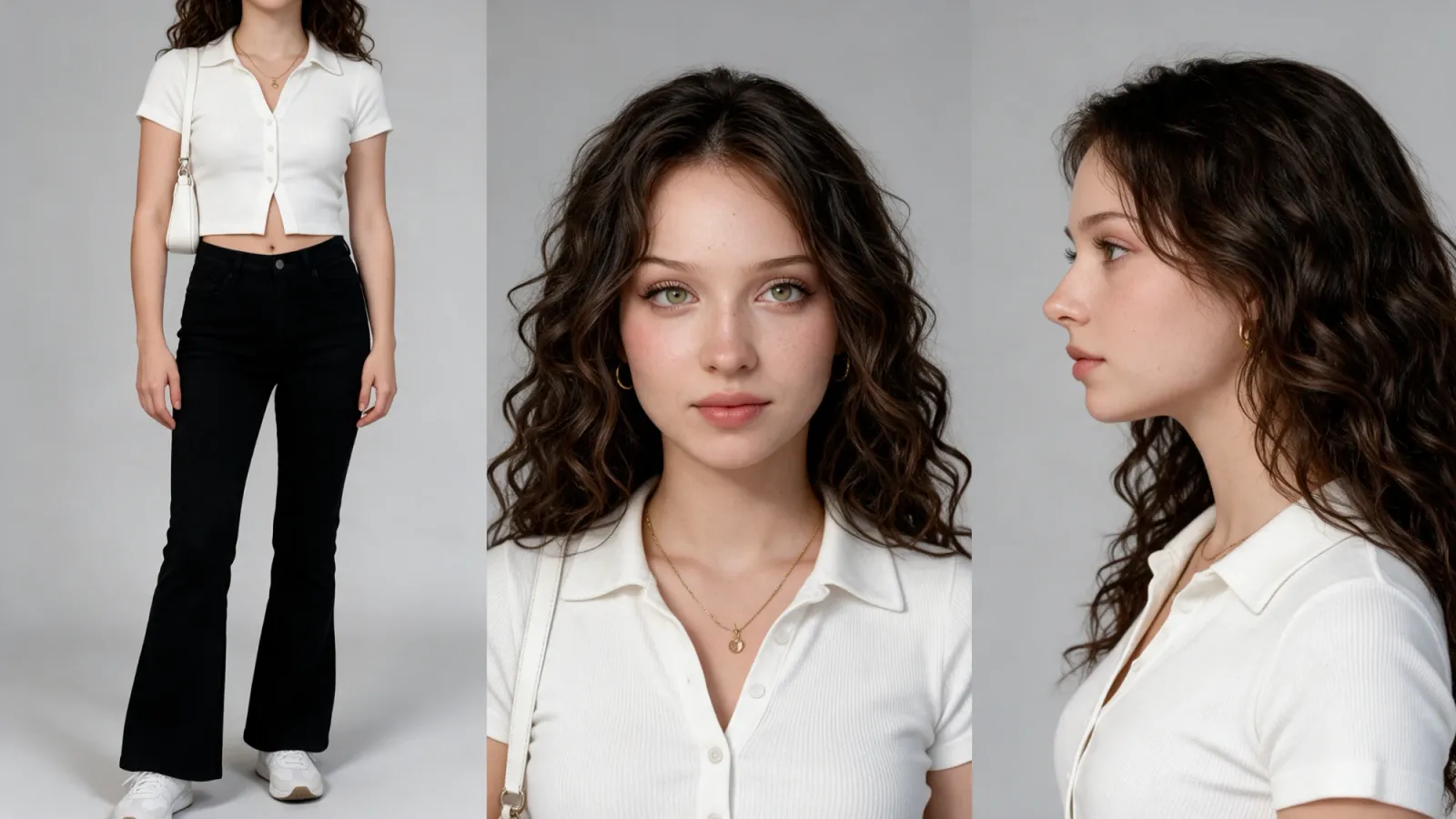
Using the reference image, keep the exact same woman: same face, facial features, eye color, freckles, skin tone, curly brown hair and identity. Do not change her face.

Change only her outfit and styling to match a 1970s-inspired street look:
- Fitted white short-sleeve knit top with a collar and small buttons, cropped short so a little of the midriff shows, the bottom split open slightly at the front
- Black high-waisted flared trousers
- Small white leather shoulder bag on a thin strap
- White sneakers
- Thin gold necklace and small gold hoop earrings
- Natural minimal makeup, voluminous curly hair worn loose

Create a character reference sheet: three panels side by side on a plain light grey studio background.
Panel 1: full body, standing, front view, arms relaxed, bag on her shoulder.
Panel 2: front close-up portrait, head and shoulders, neutral expression.
Panel 3: side profile close-up, head and shoulders.

Soft, even studio lighting, photorealistic, sharp detail, consistent outfit across all three panels.
Two tips that saved me regenerations:
- Use a neutral expression in the sheet. A smiling reference leaks smiles into scenes where the character should be scared.
- Keep the sheet background plain grey. Scene lighting gets applied later in the video prompt.
Step 3: Why do you need environment plates?
An environment plate is an empty image of a location, with no people in it. It does for locations what the character sheet does for people: it locks the look so every shot happens in the same place.
Street plate
The fastest way to get a perfect match is to take a screenshot from your reference video and remove the people:
Remove the woman completely from the image and fill in the background naturally where she was standing: the sidewalk, dappled tree shadows, the street and the buildings behind her. Keep everything else exactly the same: same camera angle, framing, lighting, colors and every object. No people in the foreground. Photorealistic, seamless.Or generate it from scratch:
Photorealistic cinematic still, 16:9, eye-level camera, 35mm lens, warm summer afternoon, slightly faded teal-and-orange film grade, soft film grain.

An empty Brooklyn street corner. The left quarter of the frame is filled by the sunlit orange-red brick wall of a building, with a small stone base step at the bottom, very close to camera. A wide grey concrete sidewalk runs from the foreground toward the background, covered in soft dappled tree shadows. On the right edge, a thick tree trunk surrounded by a low black iron hoop fence.

Beyond the sidewalk, an empty asphalt street with a white dashed lane line and round manhole covers curves away to the right. In the background: a red-brick building with dark teal-green garage doors and a black fire escape, large leafy green trees lining the street, a white street sign on a thin pole, a small tan bollard on the corner, a dark SUV parked in the distance, and rows of red-brick townhouses on the right with a few tiny pedestrians far away.

Bright natural sunlight, high contrast between sunlit and shaded areas, shallow depth of field, no people in the foreground, no cars in the foreground.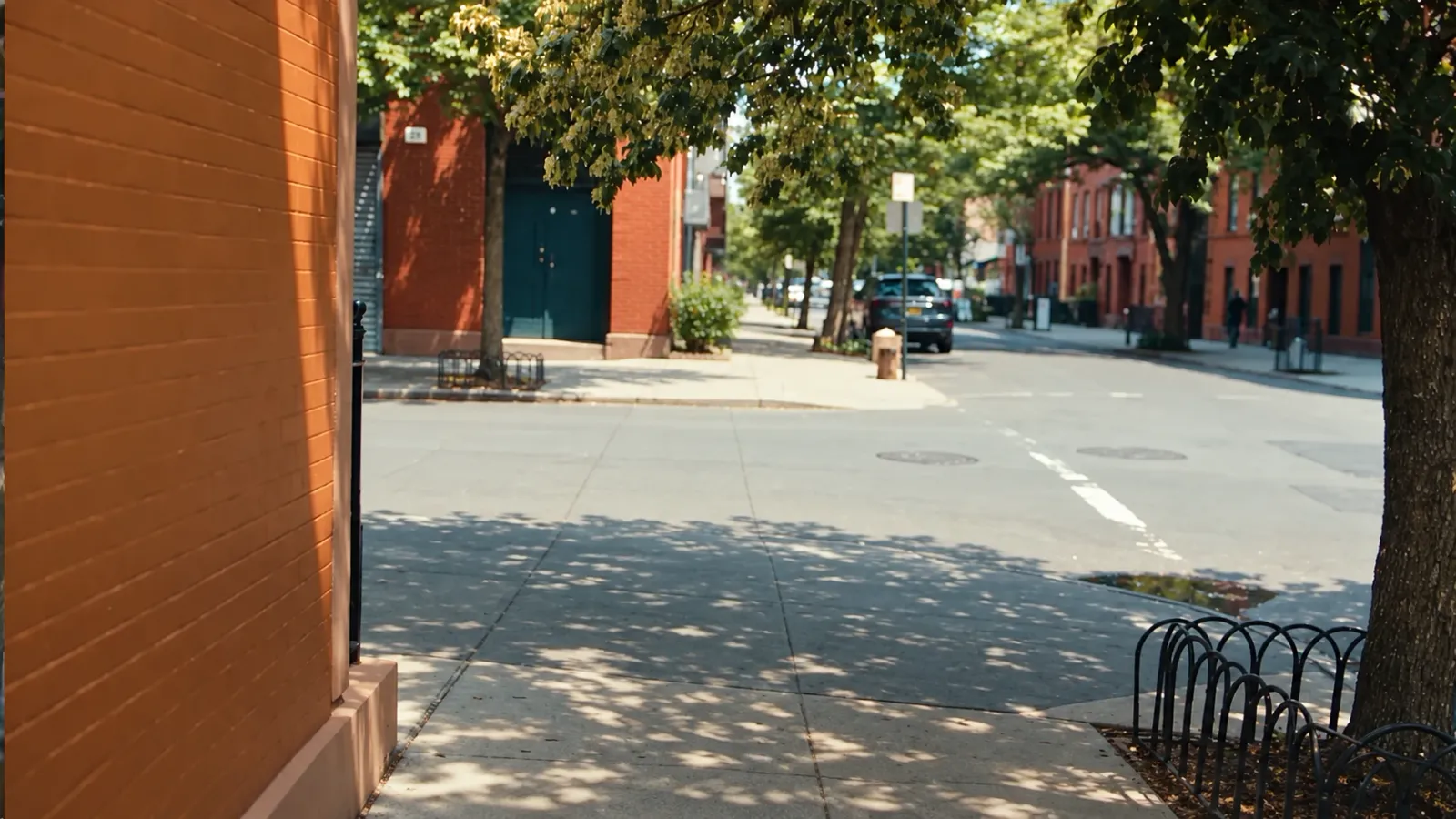
Office plate
Photorealistic cinematic still, 16:9, film noir, 1970s mafia boss office. Dark wood-panelled walls, heavy navy blue velvet curtains on the left, a tall window behind them casting a hard cold blue beam of light diagonally through thick cigar smoke and haze. A red leather chesterfield wingback chair beside a dark wooden desk with a crystal ashtray, a cigar box and a green glass banker's lamp glowing warm. Teal and red color grade, crushed blacks, volumetric light, no people.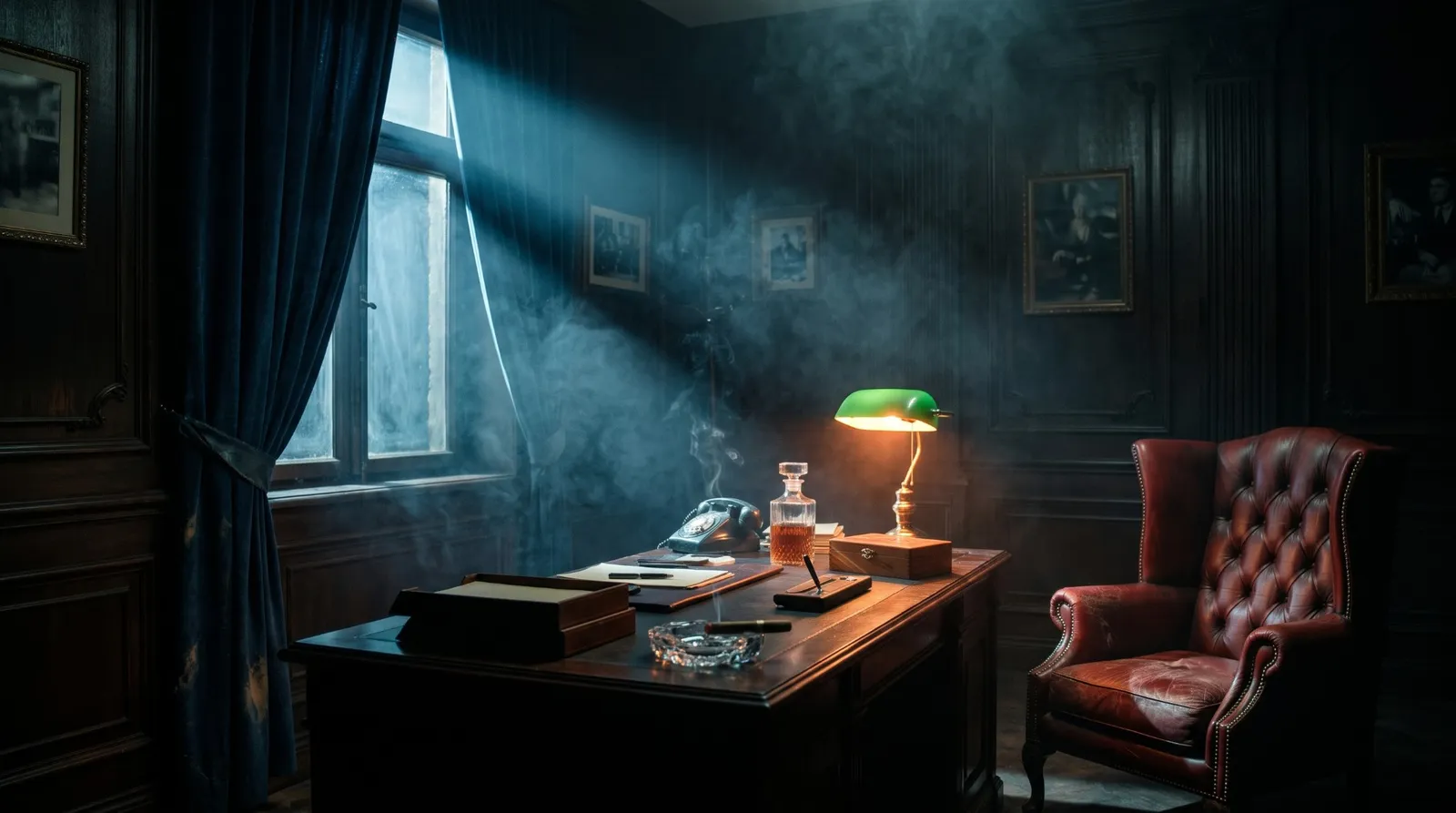
Step 4: What are the exact video prompts?
Upload four references in Akool before generating:
- @Image1 = girl character sheet
- @Image2 = boss character sheet
- @Image3 = street plate
- @Image4 = office plate
I split the film into three generations. Part 1 is a single 30 second multi-shot clip, Part 2 covers the reveal, and the last line is its own short clip.
Part 1 (30 seconds): the kidnapping and the offer
Cinematic 16:9, 1970s gangster film, soft film grain, real-time speed, no slow motion, hard cuts between shots, no fades. Characters must match @Image1 and @Image2 exactly in every shot.

[0 to 8s] STREET. Use @Image3 as the exact location and camera angle. One continuous handheld shot, bright summer afternoon, warm faded color grade, dappled tree shadows on the sidewalk. The street is empty at the start. @Image1 walks toward the camera along the sidewalk, talking on her phone, unaware. A black 1970s Cadillac sedan drives into frame from the left and rolls to a stop at the curb right behind her. The rear doors swing open, and two men in black suits and black balaclavas jump out and rush up behind her. The camera pushes in as one man pulls a black cloth bag over her head and both grab her arms. She struggles and drops her phone. The camera widens as they shove her into the back seat, her legs kicking, and slam the doors. The car drives off to the right. The camera holds on the empty sidewalk with her phone on the ground.

[8 to 10.5s] HOOD OFF. Extreme close-up, static, framed from forehead to lips, pitch black background, soft cold top light. A black cloth hood covers @Image1's head; a hand yanks it upward and off in one fast motion. She is dazed: mouth hanging open, breathing heavily through it, head swaying slightly. Her eyes stay closed, then flutter half-open in a quick weak squint and droop shut again. Never still.

[10.5 to 12s] OFFICE WIDE. Use @Image4 as the office. Film noir, teal and red color grade, cigar smoke haze, volumetric light. Medium-wide side shot, static, camera at seated eye level, not looking down. @Image2 sits in a red leather wingback chair placed right at the end of his wooden desk, framed in the center of the shot, visible from the knees up. Realistic human proportions and scale: he and the desk are at the same distance from the camera, the desk surface sits at his waist height, and his seated head is well below the picture frames on the wall. He leans back with a cigar near his mouth, a hard cold beam of window light cutting through the smoke, navy curtains on the left.

[12 to 14s] GIRL. Medium front shot: @Image1 sits in a wooden armchair in front of a dark wood-panelled wall, three men in black suits and balaclavas standing behind her. She gasps, then leans forward and shouts angrily, "Why did you bring me here?"

[14 to 19s] BOSS. Medium close-up, very slow push-in: @Image2 relaxed in the red leather chair, a green banker's lamp glowing out of focus behind him. He takes a long drag on the cigar, slowly exhales a big cloud of smoke upward that partly covers his face, and says calmly through the smoke, "To make you an offer... of course."

[19 to 20.5s] INSERT. Close-up of @Image1's hands nervously clutching the collar of her white knit top.

[20.5 to 22s] GIRL. Close-up: @Image1, eyes narrowed, suspicious, says "What kind of offer?"

[22 to 25.5s] OVER-THE-SHOULDER. From behind @Image1's chair toward @Image2 at his desk under the green lamp, calm, gesturing with his cigar, says with a slight knowing pause: "You make... those videos."

[25.5 to 30s] GIRL. Medium shot: @Image1 in the chair, masked guards behind her in the dark. She puts her hand on her chest, offended and defensive, and says "I don't do those kinds of videos." She holds an offended stare to the end.
Part 2 (8 seconds): the reveal
Same office as @Image4, film noir, teal and red color grade, cigar smoke haze, soft film grain, real-time speed, hard cut between shots. Characters must match @Image1 and @Image2 exactly.

[0 to 5s] Close-up, slow push-in: @Image2 leans forward into the green lamp light, tinted glasses, annoyed and impatient, explaining slowly as if to a child: "AI videos. Realistic AI videos. What is wrong with you?"

[5 to 8s] Hard cut. Medium shot: @Image1 sitting in the chair, masked guards behind her. It clicks: her mouth slowly drops open, embarrassed and shocked, hand still on her chest.
Part 3 (4 seconds): the call to action
Same office as @Image4, film noir, teal and red color grade, cigar smoke haze, soft film grain. Real-time speed, action starts immediately in the first second.

Medium-wide shot, camera at seated eye level, static. @Image2 sits in a red leather wingback chair positioned behind the end of his wooden desk, framed slightly left of center, visible from the knees up. Realistic human proportions and scale: the desk surface sits at his waist height, the green banker's lamp is in the foreground at the edge of frame, slightly out of focus. A tall man in a black suit and black balaclava stands in the shadows directly behind his chair. Navy curtains and a beam of window light on the left.

From the very first frame, @Image2 is already leaning back and speaking. He adjusts his tinted glasses with one hand while saying, smug and confident, "Comment realism, kid. I'll send you the guide." He finishes the line within the first three seconds, then holds a smug smile and stays still.
What went wrong, and how did I fix it?
This is the part most tutorials skip. My first attempts had real problems, and each fix taught me something about how Seedance reads prompts.
| Problem | Why it happened | The fix |
|---|---|---|
| The Cadillac was already parked | I wrote "a car parked behind her" | Describe the motion: "drives into frame from the left and rolls to a stop". Add "the street is empty at the start". |
| Hood shot had a slow fade and slow-motion eyes | The prompt said "slowly" twice | Add "no fade-in, starts instantly, real-time speed, no slow motion". Remove the word "slowly". |
| She looked frozen and didn't breathe | Nothing in the prompt told her to move | "Mouth hanging open, breathing heavily through it, head swaying slightly. Never still." |
| She blinked too much | Vague eye direction | "Eyes stay closed, one quick weak flutter, then droop shut again." |
| The boss looked giant next to a tiny desk | Too wide a frame, so the model cheated the scale | Frame tighter ("knees up"), camera at seated eye level, "desk at waist height, same distance from camera". |
| The background didn't match the reference | Text-only location description | Environment plates as image references. |
Save credits: only regenerate the broken shot
When one shot in a multi-shot clip fails, don't regenerate the whole clip. Cut the clip right before the bad shot and generate only that shot on its own. The minimum length was 4 seconds, so I told the model to start the action "in the very first frame" and finish the line "within the first three seconds". That way I could trim the extra tail instead of paying for another full clip.
How do you edit it all together?
- Part 1, then Part 2, then Part 3, then a black end card.
- Trim the street and smoke shots by a second or two if the pacing drags.
- Add bold captions and enlarge the key words: "What kind of OFFER?", "I don't do THOSE", "AI VIDEOS", "Comment REALISM".
- End card: black screen, your handle, and your call to action.
Frequently asked questions
Can AI really make videos this realistic?
Yes. The realism comes from the references, not the model alone. Character sheets and environment plates keep faces and locations consistent, and frame-by-frame direction in the prompt gives you believable timing and emotion.
How do I keep the same face in every AI video shot?
Make a three panel character sheet (full body, front, profile) from a photo and attach it as an image reference in every generation. Add "characters must match @Image1 exactly in every shot" to the prompt.
Can I use my own face?
Yes. Start the character sheet prompt from your own photo and tell the model to keep your face and identity and change only the outfit. That's exactly how I made the boss.
Why does my AI video move in slow motion?
Words like "slowly" and "gradually" push the model into slow motion. Add "real-time speed, no slow motion" and describe actions with fast verbs like "yanks", "jumps out" and "slams".
Can I recreate any viral video like this?
You can recreate the structure: the pacing, shot types and camera moves. Use your own characters, locations and story so the result is yours, and credit the original if it inspired you.
How long did this take?
Most of the time went into the breakdown and the references. Once the sheets and plates were ready, the video itself was three generations plus one fix.
If you build something with these prompts, tag me on Instagram. I'd love to see your version. And if you want more breakdowns like this, I post full AI build tutorials on my YouTube channel, @danishsofiAI.
Ready to build this for your business?
I help ambitious founders and businesses build production-ready automation systems. Let's discuss your specific needs.
Book a Discovery CallRelated Tutorials
How I Made an AI Short Film with Consistent Characters (Every Prompt)
The full workflow behind my post-apocalyptic AI short film about a girl and her dog: a film plan written with Claude, character sheets made with Seedream 5.0 Pro, and nine scenes generated with Seedance 2.5 on the RunningHub canvas. Every prompt is on this page, ready to copy.
Build an AI Second Brain in Telegram with n8n and Supabase
A complete walkthrough of the AI Second Brain I use daily — a Telegram bot that captures anything I send it, searches my memories semantically instead of by keyword, and resurfaces important items using spaced repetition. Two n8n workflows, one Supabase table, and around $2-5 a month in OpenAI credits.
FREE Claude Code + Claude Desktop Setup With Official Anthropic Models (2026 Guide)
Learn how to set up Claude Code and Claude Desktop for free using official Anthropic models including Claude Fable 5, Sonnet 5, Opus 4.8, and Sonnet 4.6. Full step-by-step tutorial with gateway configuration, API keys, and VS Code integration.