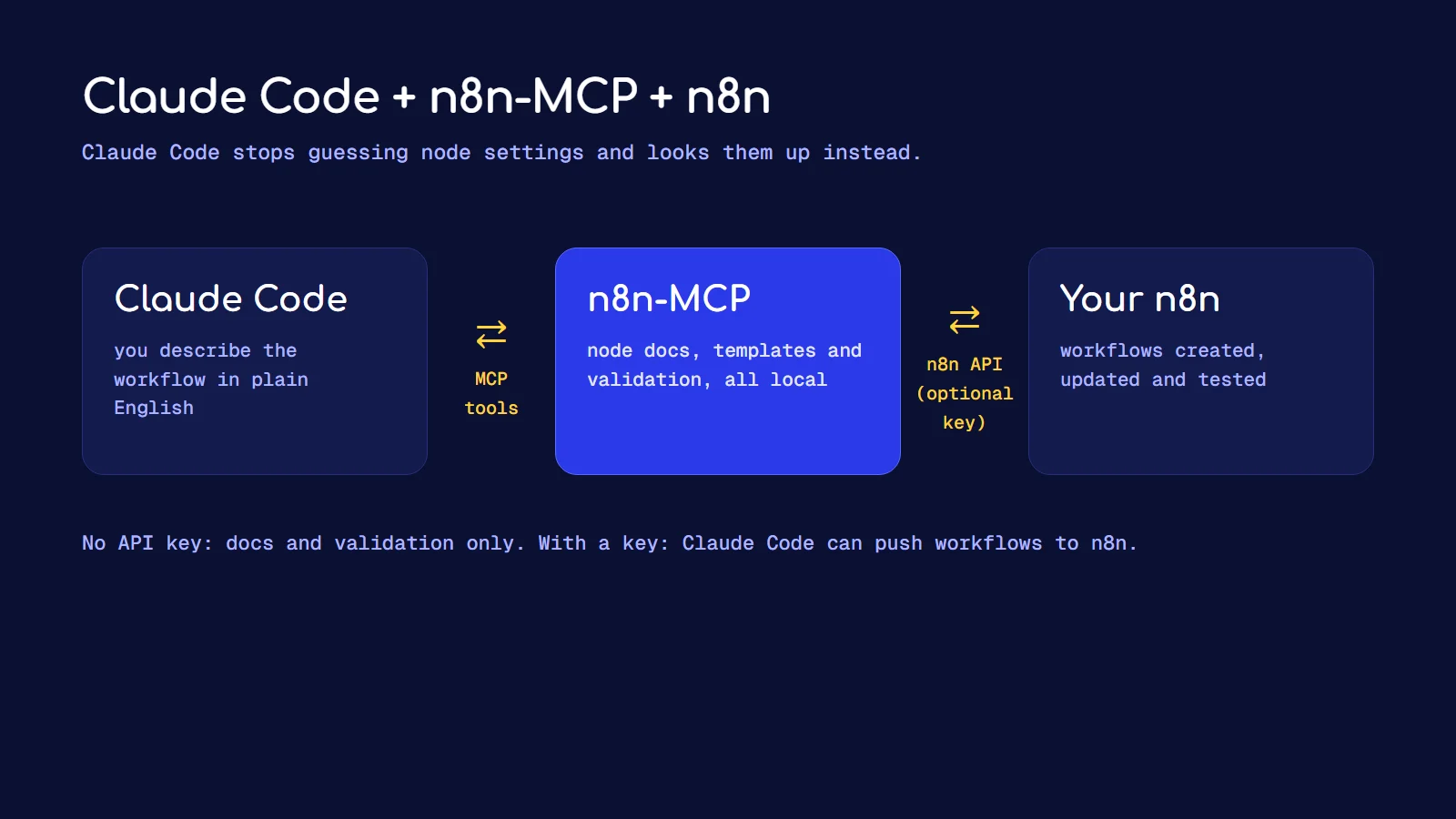
To build n8n workflows with Claude Code, connect them with n8n-MCP, an open-source MCP server that gives Claude Code the real documentation for every n8n node and, if you add an API key, the ability to create and update workflows in your own n8n instance. It is one command to install. After that you describe a workflow in plain English and Claude Code builds it, validates it and pushes it to n8n.
Without it, Claude Code guesses node names and parameters from memory, and n8n workflow JSON is unforgiving. One wrong property name and the import fails. With n8n-MCP it looks the node up instead of guessing. That is the whole reason this setup is worth ten minutes.
What is n8n-MCP?
MCP (Model Context Protocol) is the standard way to give an AI assistant extra tools. n8n-MCP is an MCP server built specifically for n8n. According to the project, it covers 3,135 nodes (core and community) and 2,352 workflow templates.
It gives Claude Code two kinds of tools:
| Tool group | Needs an n8n API key? | Examples | What it lets Claude Code do |
|---|---|---|---|
| Documentation and validation | No | search_nodes, get_node, validate_workflow, search_templates | look up real node settings, check a workflow before it ships, start from a template |
| Instance management | Yes | n8n_create_workflow, n8n_update_partial_workflow, n8n_test_workflow | create, edit and test workflows inside your n8n |
You can start with the first group only. Claude Code writes the workflow JSON, validates it, and you import it yourself. When you trust the setup, add the API key so it can push workflows directly.
What do you need before you start?
- Claude Code installed and working in a terminal. If you are new to it, start with my beginner's guide to building with Claude Code.
- Node.js, because the server runs through
npx. - An n8n instance (n8n Cloud or self-hosted) if you want the management tools.
- An n8n API key, which you create inside n8n under Settings, then n8n API.
How do you connect n8n-MCP to Claude Code?
Step 1: Add the server (docs only)
Run this in your terminal. It gives Claude Code the documentation and validation tools, with no access to your n8n yet:
claude mcp add n8n-mcp \
  -e MCP_MODE=stdio \
  -e LOG_LEVEL=error \
  -e DISABLE_CONSOLE_OUTPUT=true \
  -- npx n8n-mcp
The three environment variables keep the server quiet, so its log output doesn't get mixed into the conversation with Claude Code.
Step 2: Add your n8n instance (optional)
To let Claude Code create and edit workflows, remove the server and add it again with your instance URL and API key:
claude mcp remove n8n-mcp
claude mcp add n8n-mcp \
  -e MCP_MODE=stdio \
  -e LOG_LEVEL=error \
  -e DISABLE_CONSOLE_OUTPUT=true \
  -e N8N_API_URL=https://your-n8n-instance.com \
  -e N8N_API_KEY=your-api-key \
  -- npx n8n-mcp
If n8n runs on your own machine, the URL is http://localhost:5678.
On Windows PowerShell the command is the same, but you use a backtick at the end of each line instead of a backslash, and wrap each -e value in single quotes.
Step 3: Check it worked
claude mcp list
claude mcp get n8n-mcp
Then start Claude Code and type /mcp. You should see n8n-mcp connected with its tools listed. Claude Code starts the server on its own whenever a conversation begins, so there is nothing to keep running.
Step 4: Decide on the scope
By default, claude mcp add saves the server to your own settings, which keeps your API key private. If you want a whole team to share the setup, add --scope project instead. That writes a .mcp.json file to the project folder. Don't commit an API key in that file. Put the key in an environment variable instead.
How do you prompt Claude Code to build a workflow?
Be specific about the trigger, each step and the output. A good prompt reads like a brief, not a wish:
> Build an n8n workflow. Trigger: a Telegram message to my bot. Step 1: if the message is a voice note, transcribe it with OpenAI. Step 2: summarise it and pull out any tasks. Step 3: save the summary and tasks as a row in my Supabase table notes. Step 4: reply on Telegram with the summary. Look up each node with n8n-MCP before you configure it, then validate the workflow before creating it.
That is close to the AI second brain on Telegram I built with n8n and Supabase. The last two sentences of the prompt matter most. They tell Claude Code to use the real node docs and to validate before it touches your instance.
A few habits that save time:
- Name the credentials. Credentials are set up inside n8n, not by Claude Code. Tell it which existing credential each node should use, by name.
- Ask for one workflow at a time. Big multi-workflow prompts produce big, hard-to-review changes.
- Start from a template. Ask Claude Code to search the templates first. Editing a working template beats building from nothing.
What are the safety rules?
The n8n-MCP project itself warns you never to let AI edit production workflows directly, and I agree. My rules:
- Work on a copy. Duplicate the workflow, let Claude Code edit the copy, compare, then switch over.
- Use a test instance if you can. A local n8n in Docker costs nothing and can't break anything that matters.
- Export a backup first. Download the workflow JSON before any AI edit.
- Validate before deploy. Ask for
validate_workflowon every change, and read the result. - Go read-only when you only need docs. n8n-MCP supports a
DISABLED_TOOLSsetting, so you can switch off the create and update tools entirely.
Claude Code with n8n, or Claude Code instead of n8n?
People ask whether Claude Code replaces n8n. For most automations it doesn't. n8n gives you the visual canvas, the scheduling, the retries, the execution history and hundreds of integrations already built. Claude Code is fast at building and editing those workflows, and at writing the custom code nodes inside them.
Where I would skip n8n is a workflow that is mostly custom logic with one or two integrations. That is often simpler as a small script or app, and Claude Code is good at building exactly that.
Frequently asked questions
Is n8n-MCP free?
Yes. It is open source under the MIT license, and you run it on your own machine with npx. The project also offers a hosted version with a free daily limit if you don't want to install anything.
Do I need an n8n API key to use it?
No. Without a key you still get node search, node documentation, templates and workflow validation. The key is only needed if you want Claude Code to create, update or test workflows in your n8n instance.
Does it work with self-hosted n8n?
Yes. Point N8N_API_URL at your instance, for example http://localhost:5678 for a local install, and create the API key inside that instance.
Can Claude Code see my n8n credentials?
Treat any API key you give an AI tool as sensitive. Create a dedicated n8n API key for this, keep it out of shared files like .mcp.json, and delete it in n8n if you stop using the setup.
Why does Claude Code get n8n node settings wrong without MCP?
Because it is working from memory, and n8n nodes change between versions. n8n-MCP gives it the current node properties to read, so it configures what actually exists instead of what it remembers.
If you want automations like this built for your business, book a call or get in touch.