You can make AI clips offline and for free, straight from your long videos. You need three open-source pieces: yt-dlp to download the video, faster-whisper to transcribe it with word-level timestamps, and FFmpeg to cut, reframe and burn in captions. The only part paid tools really charge for is picking the moments, and that can be done with a simple scoring formula or a local model through Ollama.
I know this works because I built it. ClipForge is my local clipper: paste a link or drop in a file, choose how many clips you want, and it renders vertical Shorts with captions on your own computer. No API keys, no .env file, nothing sent to a cloud AI. Here is exactly how it works, including the scoring formula, so you can build your own or just understand what the paid tools are doing.
Why clip videos offline at all?
Three reasons kept pushing me toward a local tool.
- Cost. Cloud clippers charge by the minute of uploaded video. If you clip long podcasts every week, that adds up fast. Local transcription costs nothing after the first model download.
- Privacy. Client footage never leaves my machine. For unreleased episodes, that matters.
- Control. When a paid tool picks a bad clip, you can't see why. With a local formula, every score is explainable and every weight is a number I can change.
The trade-off is honest: the first run downloads about 1.5 GB of Whisper model weights, and on a CPU only machine the transcription is slow. With an NVIDIA GPU it is fast.
What do you need to run it?
| Requirement | Why | Notes |
|---|---|---|
| Python 3.11+ | runs the app | FastAPI backend |
| FFmpeg on your PATH | cutting, reframing, captions | on Windows: winget install Gyan.FFmpeg |
| yt-dlp | downloading from a link | not needed for file uploads |
| NVIDIA GPU (optional) | fast transcription | needs CUDA 12 and a matching cuDNN |
The app detects the GPU on its own and falls back to the CPU if there isn't one. There is also a Compute switch (Auto, GPU, CPU) so you can force it.
How does it work, step by step?
The whole pipeline is five stages:
- Download. yt-dlp pulls the video from the link, or you upload a file directly.
- Transcribe. faster-whisper (the
mediummodel) turns speech into text with a timestamp on every word. This is what makes word-by-word captions possible later. - Select. The app builds candidate windows from the transcript and scores each one. More on this below, because it is the interesting part.
- Render. For each chosen clip, FFmpeg cuts the segment, reframes it to 9:16 and burns in styled captions.
- Deliver. Clips show up in the browser as each one finishes, with a live progress bar for every stage.
Progress streams to the browser over Server-Sent Events, so you watch "Transcribing... 42%" update in real time instead of staring at a spinner.
How do you pick good clips without paid AI?
This is the question everyone asks, and the answer is less magic than you would think.
First, the app builds candidate windows that line up with sentence boundaries in the transcript. A window has to run at least 30 seconds and keeps going until the sentence finishes, so a clip never stops mid-thought. There is a hard cap at 90 seconds for runaway monologues, and the ideal length it aims for is 40 seconds.
Then every window gets a score from four signals:
| Signal | What it measures | Weight |
|---|---|---|
| Word density | words per second, maxing out around 3 | 2.0 |
| Completeness | does the window end on a full sentence | 1.5 |
| Hook words | questions plus words like "why", "mistake", "secret", "never", "money" | 1.5 |
| Length fit | how close the window is to 40 seconds | 1.0 |
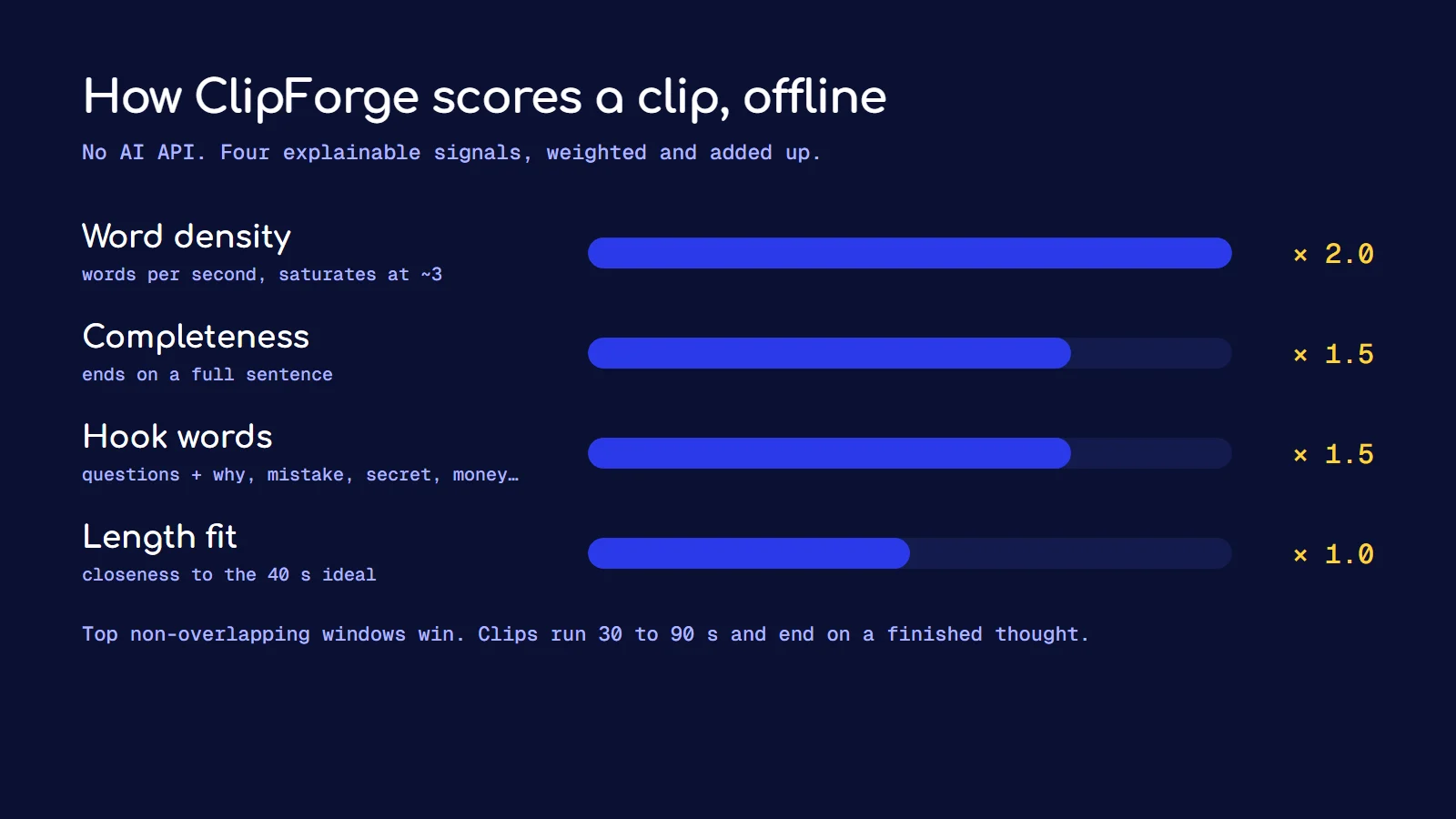
Density gets the highest weight because a window that is mostly silence or slow talk almost never makes a good clip. Questions get a small bonus on top of the hook words, because a question in the first few seconds is one of the most reliable ways to stop a scroll.
Once everything is scored, the app picks the highest scoring windows that don't overlap, then fills up to the number of clips you asked for.
The ending problem
A clip can end on a full stop and still feel unfinished. "And that's when I realised..." is a complete sentence, but it leaves the story hanging. So the selector looks for two extra signals that the topic actually moved on:
- A real pause. 0.6 seconds or more of silence usually means a natural beat.
- A vocabulary shift. If the next line shares less than 25% of its words with the current one, the speaker has probably changed subject.
When either signal shows up shortly after the target length, the clip ends there instead of at the first full stop. That one change made the clips feel far more complete.
When you want smarter picks
The formula is good at finding dense, punchy talking. It can't tell a funny moment from a boring one. For that, ClipForge has an optional mode that sends each window to a local model through Ollama (Llama 3 by default) for scoring and titling. It is still zero external API calls, because Ollama runs on your own machine.
How do the captions and reframing work?
Captions are built as ASS subtitle files, not SRT. ASS supports per-word timing and colours, which is what you need for the karaoke style where the current word lights up yellow. FFmpeg burns the ASS file into the video. The caption styles are defined in one file that drives both the live preview in the browser and the final render, so what you preview is exactly what you get.
There are two fit modes:
- Crop (fill). The classic vertical crop that fills the whole 9:16 frame.
- 1:1 Square. A 9:16 reel with the video cropped to a rounded square in the middle, a title above it and captions below. This layout works really well for podcast clips where cropping to a single face would cut out the guest.
What goes wrong, and how do you fix it?
- "Unable to load libcudnn" or other CUDA errors. This is almost always a cuDNN version that doesn't match your CUDA version. Install CUDA 12 with the matching cuDNN, or let it fall back to the CPU.
- "ffmpeg was not found on PATH". Install FFmpeg and open a new terminal so the PATH updates.
- The first run is slow. It is downloading the Whisper model once. Every run after that starts quickly.
Should you build your own or pay for a tool?
If you clip a few videos a month, a paid tool is fine and saves you setup time. If you clip every week, clip for clients, or care where the footage goes, a local tool pays for itself quickly. And if you want the AI to look for something specific, like every mention of pricing, you will want prompt-driven selection. I wrote about that in how I built my own Opus Clip alternative with Claude Code, which uses the same caption approach with GPT-4o choosing the moments.
Frequently asked questions
Is there a completely free AI clip maker?
Yes, if you run it yourself. yt-dlp, faster-whisper and FFmpeg are all free and open source, and they cover downloading, transcription, cutting and captions. Clip selection can be a local formula or a local model through Ollama, so there is nothing to pay for after setup.
Can I make AI clips without a GPU?
Yes. faster-whisper runs on a CPU, it is just slower, especially with the medium model. The scoring and the FFmpeg render are light enough for any modern laptop.
How long should a short-form clip be?
My selector aims for about 40 seconds, with a minimum of 30 and a maximum of 90. More important than the exact length is that the clip ends on a finished thought, not halfway through a story.
Does offline clipping work for non-English videos?
Whisper transcribes many languages, and the sentence detection in ClipForge also recognises the Hindi full stop (the danda). Caption fonts need to support the script you are using.
Is the local formula as good as paid AI clip selection?
For talking-head content it gets surprisingly close, because density, complete sentences and hook words are what most good clips have in common. It is weaker at humour and emotion. That is where a local model through Ollama, or a prompt-driven tool, does better.
If you want a clipping workflow like this set up for your channel or your agency, get in touch.